 button to display the Win95 START menu.
First, click the
button to display the Win95 START menu.
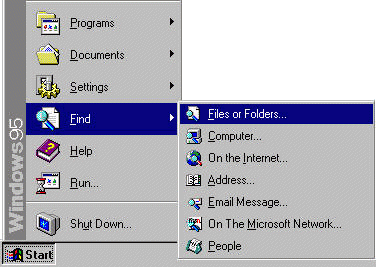
The FIND icon is about mid-way up the START menu.
Hold the cursor over it until the FIND sub-menu appears and
Click on the "Files or Folders..." line.
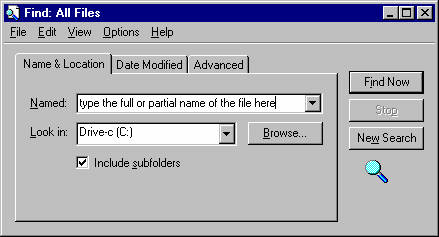
The FIND box appears.
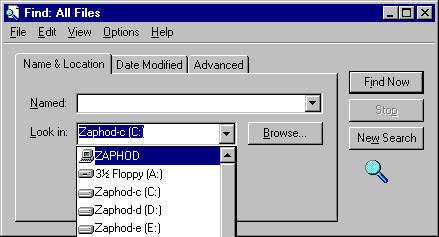
If you want to search other drives or your entire
computer click the  button.
Here you can select another drive or "My Computer"
to search
everything from your floppy to your CD-Rom.
(Note: I changed the name of my computer to Zaphod, so this will
look different).
If you wish to search by the date the file was made or last altered
click the "Date Modified" tab.
For file size or text string searches click the "Advanced" tab.
Once you have selected all the parameters for your search, click the
"Find Now" button.
If a whole bunch of files start appearing in the "found" window you
can press the "Stop"
button and try to refine your search parameters.
For further info on the date and advanced searches look in Win95 HELP.